Cursor

Cursor

Built to make you extraordinarily productive, Cursor is the best way to code with AI.

3.0
11
Visits
Visit

Available Pages

Version History

Design Analysis

Cursor Home design analysis

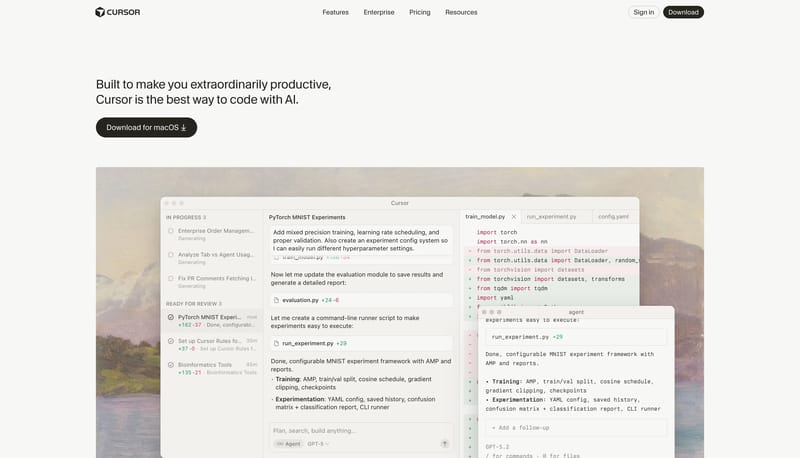
Build the page as warm paper, quiet chrome, and one believable software window at a time. Let the system feel productive and premium rather than speculative or flashy. Use black pills as the clearest action voice. Use la...

Key Takeaways

  • Build the page as warm paper, quiet chrome, and one believable software window at a time.
  • Let the system feel productive and premium rather than speculative or flashy.
  • Use black pills as the clearest action voice.
  • Use large software windows, workflow surfaces, and code-adjacent panes as the main proof language.
  • Keep the backdrop warm and almost empty around them.
  • Keep the palette almost monochrome and warm.

Overview

  • Build the page as warm paper, quiet chrome, and one believable software window at a time.
  • Let the system feel productive and premium rather than speculative or flashy.
  • Use black pills as the clearest action voice.

Image Direction

  • Use large software windows, workflow surfaces, and code-adjacent panes as the main proof language.
  • Keep the backdrop warm and almost empty around them.

Colors

  • Keep the palette almost monochrome and warm.
  • Use dark ink for text and main actions, with only subtle tonal shifts elsewhere.

Typography

  • Use one restrained grotesk across the whole hierarchy.
  • Keep utility labels compact and let size, not chroma, create most of the hierarchy.
SpacePlay/PauseSeek 1sShiftSeek 10s