Cursor

Cursor

Built to make you extraordinarily productive, Cursor is the best way to code with AI.

3.0
6
Visits
Visit

Available Pages

Version History

Design Analysis

Cursor Home design analysis

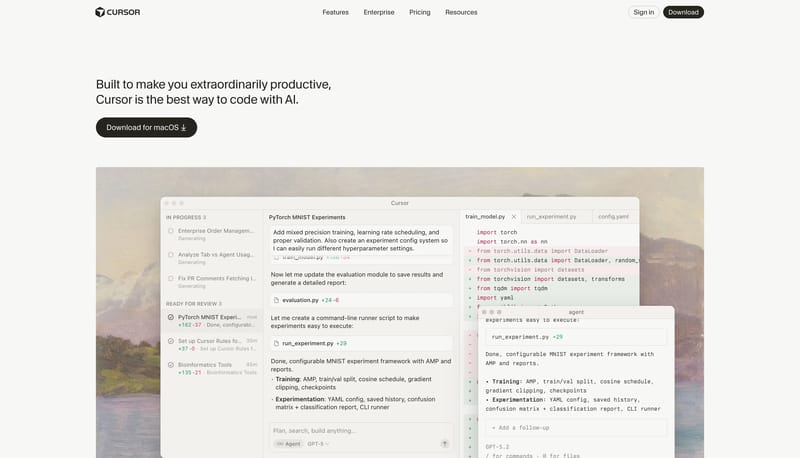
Build the page as warm paper, quiet chrome, and one believable software window at a time. Let the system feel productive and premium rather than speculative or flashy. Use black pills as the clearest action voice. Use la...

Key Takeaways

  • Build the page as warm paper, quiet chrome, and one believable software window at a time.
  • Let the system feel productive and premium rather than speculative or flashy.
  • Use black pills as the clearest action voice.
  • Use large software windows, workflow surfaces, and code-adjacent panes as the main proof language.
  • Keep the backdrop warm and almost empty around them.
  • Keep the palette almost monochrome and warm.

Overview

  • Build the page as warm paper, quiet chrome, and one believable software window at a time.
  • Let the system feel productive and premium rather than speculative or flashy.
  • Use black pills as the clearest action voice.

Image Direction

  • Use large software windows, workflow surfaces, and code-adjacent panes as the main proof language.
  • Keep the backdrop warm and almost empty around them.

Colors

  • Keep the palette almost monochrome and warm.
  • Use dark ink for text and main actions, with only subtle tonal shifts elsewhere.

Typography

  • Use one restrained grotesk across the whole hierarchy.
  • Keep utility labels compact and let size, not chroma, create most of the hierarchy.
SpacePlay/PauseSeek 1sShiftSeek 10s