
Macfolio

Macfolio

Discover the best software, hardware, workspace setups, books, videos, and posts for the Mac ecosystem.

4.0
58
Visits
Visit

Available Pages

Version History

Design Analysis

Macfolio Home design analysis

Build for a bright editorial catalog rather than a dark software landing page. Keep the shell quiet and spacious so the curation, not the chrome, defines the first impression. Mix practical browsing controls with more li...

Key Takeaways

  • Build for a bright editorial catalog rather than a dark software landing page.
  • Keep the shell quiet and spacious so the curation, not the chrome, defines the first impression.
  • Mix practical browsing controls with more literary article moments. The interface should feel like a thoughtful publication that also happens to route users to products.
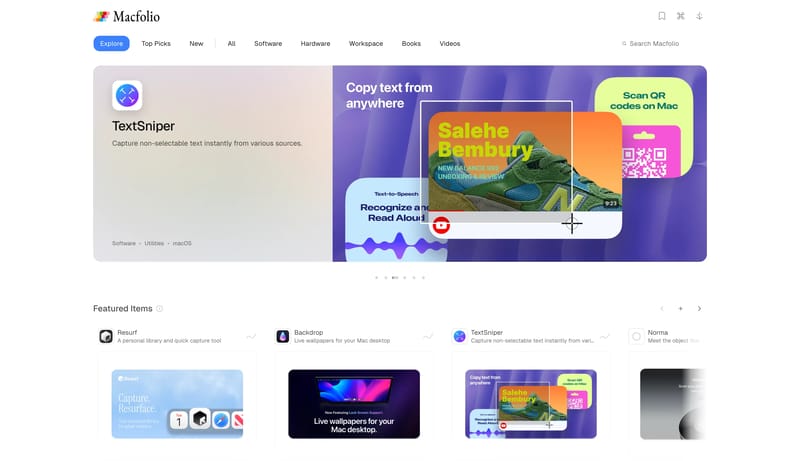
  • Use real product screenshots, device images, and object photography as the main visual language.
  • Frame assets with white space and soft card edges rather than dramatic effects.
  • Hero modules can carry one larger poster-like image, while downstream rails use repeatable thumbnail crops.

Overview

  • Build for a bright editorial catalog rather than a dark software landing page.
  • Keep the shell quiet and spacious so the curation, not the chrome, defines the first impression.
  • Mix practical browsing controls with more literary article moments. The interface should feel like a thoughtful publication that also happens to route users to products.

Image Direction

  • Use real product screenshots, device images, and object photography as the main visual language.
  • Frame assets with white space and soft card edges rather than dramatic effects.
  • Hero modules can carry one larger poster-like image, while downstream rails use repeatable thumbnail crops.

Colors

  • Use white as the page field and near-white panels for softer modules.
  • Keep primary text close to black.
  • Use one clean blue as the main state accent for selected filters and compact CTAs.

Typography

  • Use a clean sans-serif for navigation, metadata, labels, and browsing flows.
  • Reserve a serif display voice for editorial headlines and article titles.
  • Let type contrast come from family and scale, not from decorative color shifts.
SpacePlay/PauseSeek 1sShiftSeek 10s