
Kaiunta

Kaiunta

Kaiunta offers anonymous audio feedback with no surveys, forms, or friction, giving people a real voice inside teams and organizations.

3.0
1
Visits
Visit

Available Pages

Version History

Design Analysis

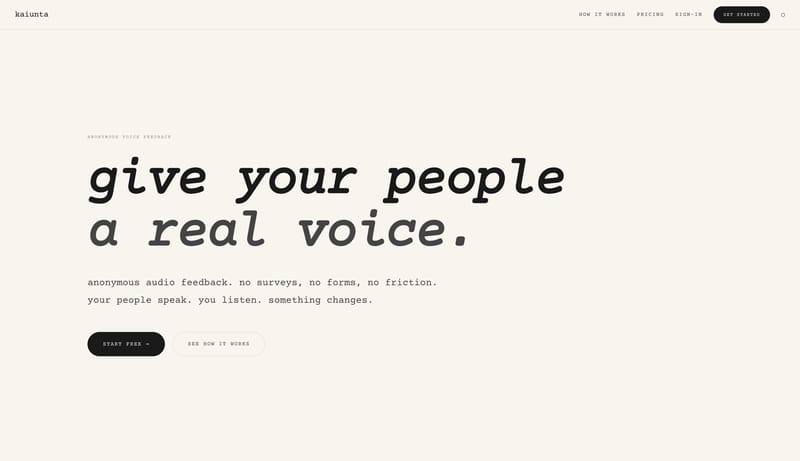
Kaiunta Home design analysis

Build a warm utility shell that feels tactile and lightweight rather than polished and corporate. Let typography and button silhouettes carry personality before introducing graphic effects. Keep the interaction model obv...

Key Takeaways

  • Build a warm utility shell that feels tactile and lightweight rather than polished and corporate.
  • Let typography and button silhouettes carry personality before introducing graphic effects.
  • Keep the interaction model obvious and uncluttered.
  • Use sparse imagery, diagrams, or prop-like product shots instead of dense visual noise.
  • Keep the scene feeling tactile and calm.
  • Base the shell on F7F4EE and keep 1A1A1A as the primary reading color.

Overview

  • Build a warm utility shell that feels tactile and lightweight rather than polished and corporate.
  • Let typography and button silhouettes carry personality before introducing graphic effects.
  • Keep the interaction model obvious and uncluttered.

Image Direction

  • Use sparse imagery, diagrams, or prop-like product shots instead of dense visual noise.
  • Keep the scene feeling tactile and calm.

Colors

  • Base the shell on F7F4EE and keep 1A1A1A as the primary reading color.
  • Use 1A1A1A as the main emphasis color and keep it scarce enough to preserve hierarchy.
  • Let EFE8DD and D9D2C7 separate secondary surfaces without introducing noisy ornament.

Typography

  • Use Courier Prime as the display voice. It should read as assertive display sans.
  • Use Courier Prime for body copy, controls, and supporting metadata.
  • Let scale and spacing create emphasis before adding extra font families or decorative effects.
SpacePlay/PauseSeek 1sShiftSeek 10s