
Backdrop

Backdrop

Add stunning live wallpapers to your Mac desktop. Thousands of 4K scenes, smooth multi-display playback, low CPU use, and Lock Screen support.

4.0
67
Visits
Visit

Available Pages

Version History

Design Analysis

Backdrop Home design analysis

Build for a premium Mac-utility storefront with strong Apple-adjacent polish. Let the first impression come from cinematic product art and large dark product banners. Keep the voice direct and product-centered rather tha...

Key Takeaways

  • Build for a premium Mac-utility storefront with strong Apple-adjacent polish.
  • Let the first impression come from cinematic product art and large dark product banners.
  • Keep the voice direct and product-centered rather than editorial or narrative-heavy.
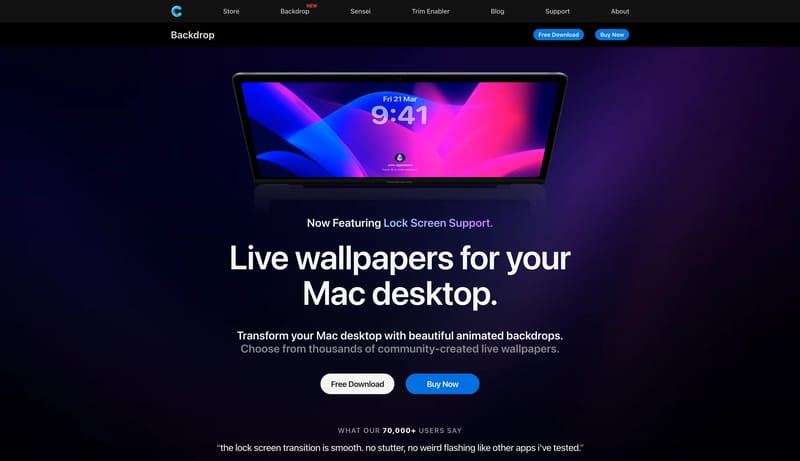
  • Use large, polished app screenshots, wallpapers, and glossy icon compositions.
  • Keep each major product module focused on one dominant scene.
  • Maintain dark, controlled image treatment with blue-violet energy rather than many competing color accents.

Overview

  • Build for a premium Mac-utility storefront with strong Apple-adjacent polish.
  • Let the first impression come from cinematic product art and large dark product banners.
  • Keep the voice direct and product-centered rather than editorial or narrative-heavy.

Image Direction

  • Use large, polished app screenshots, wallpapers, and glossy icon compositions.
  • Keep each major product module focused on one dominant scene.
  • Maintain dark, controlled image treatment with blue-violet energy rather than many competing color accents.

Colors

  • Use deep charcoal or black as the page field.
  • Keep primary text bright and clean against dark surfaces.
  • Use electric blue as the one clear accent for featured emphasis and key actions.

Typography

  • Use a neutral system-style grotesk for everything.
  • Keep titles large, centered, and clean.
  • Let image scale and contrast do more work than expressive typography.
SpacePlay/PauseSeek 1sShiftSeek 10s